Vue makes it easy to add a second language and surprisingly easy to add it badly. A few $t() calls work fine in a demo; the problems show up later, when there are a dozen locales, a few thousand keys, Polish plurals, and a Nuxt app that has to rank in every market. This guide collects the vue-i18n and Nuxt i18n practices that hold up in production, with code written for the current releases: vue-i18n v11 and @nuxtjs/i18n v10.
Use the Composition API (createI18n({ legacy: false }) plus useI18n()), keep messages in JSON files per locale, lazy-load every locale except the default, format numbers and dates with n() and d() instead of by hand, and type your message keys from the source locale. In Nuxt, let @nuxtjs/i18n own routing, lazy loading, and SEO tags rather than rebuilding them yourself.
| Package | Current major | What matters |
|---|---|---|
vue-i18n |
v11 | Legacy API deprecated (removal planned for v12), tc()/$tc() removed, v-t directive deprecated. v9 and v10 have reached end of life. |
@nuxtjs/i18n |
v10 | Ships vue-i18n v11, lazy-loads all locale files, resolves files from the i18n/ directory. |
@intlify/unplugin-vue-i18n |
v11 | Precompiles messages and enables SFC <i18n> blocks in Vite and webpack. |
If you are upgrading from vue-i18n v9 or v10, the Composition API code below works on all three versions; the main breaking changes are the removed tc() and the deprecated Legacy API.
Install the library and, for Vite projects, the bundler plugin:
npm install vue-i18n
npm install -D @intlify/unplugin-vue-i18n
Create the i18n instance in its own module so components, router guards, and stores can share it:
// src/i18n.ts
import { createI18n } from "vue-i18n";
import en from "./locales/en.json";

export const SUPPORTED_LOCALES = ["en", "fr", "de", "pl"] as const;
export type AppLocale = (typeof SUPPORTED_LOCALES)[number];

export const i18n = createI18n({
    legacy: false, // Composition API mode; the default is still true in v11
    locale: "en",
    fallbackLocale: "en",
    messages: { en },
    missingWarn: import.meta.env.DEV,
    fallbackWarn: import.meta.env.DEV,
});
// src/main.ts
import { createApp } from "vue";
import App from "./App.vue";
import { i18n } from "./i18n";
createApp(App).use(i18n).mount("#app");In components, call useI18n() and use the returned functions in the template:
<script setup lang="ts">
import { useI18n } from "vue-i18n";

const { t, locale } = useI18n();
const props = defineProps<{ name: string }>();
</script>

<template>
    <h1>{{ t("home.greeting", { name: props.name }) }}</h1>
    <p>{{ t("home.currentLocale", { locale }) }}</p>
</template>
Why legacy: false matters: createI18n still defaults to the Legacy API in v11, and @intlify/unplugin-vue-i18n tree-shakes the Legacy API out of production builds by default (its compositionOnly option is true). Forgetting the flag gives you an app that works in development and breaks after a build.
Outside components, in router guards, Pinia stores, or API clients, use the global composer directly: i18n.global.t("errors.network") and i18n.global.locale.value. Calling useI18n() outside a component's setup throws.
vue-i18n has its own message format. It looks a little like ICU MessageFormat, but plurals and special characters work differently, and ICU strings copied from another project will not render as expected.
{
    "home": {
        "greeting": "Hello, {name}!",
        "position": "You are number {0} in line",
        "brand": "Welcome to @:common.appName",
        "support": "Email support{'@'}example.com"
    },
    "common": {
        "appName": "Acme"
    }
}{name}, filled with t("home.greeting", { name: "Ada" }).{0}, filled with t("home.position", [12]).@:common.appName reuses another key, so a product name lives in one place.{'@'} outputs a literal character. The characters {, }, @, $, and | are part of the syntax, so an email address like support@example.com written plainly will fail to compile.For a deeper comparison with the ICU syntax used by next-intl, FormatJS, and most translation platforms, see our ICU MessageFormat guide. If you need real ICU in a Vue app, you can plug a custom message compiler into vue-i18n, but most teams are better off sticking with the native format.
Never put HTML in a message and render it with v-html; translated strings become an XSS vector. Use the built-in <i18n-t> (Translation) component, which maps named placeholders to slots:
{
    "signup": {
        "terms": "By signing up you accept our {link}.",
        "termsLink": "terms of service"
    }
}
<template>
<i18n-t keypath="signup.terms" tag="p">
<template #link>
<RouterLink to="/terms">{{ t("signup.termsLink") }}</RouterLink>
</template>
</i18n-t>
</template>Translators can move {link} anywhere in the sentence, and the link still renders as a real component.
vue-i18n plurals separate the forms with a pipe. The number is available inside the message as {count} or {n}:
{
    "cart": {
        "items": "no items | one item | {count} items"
    }
}
t("cart.items", 0); // "no items"
t("cart.items", 1); // "one item"
t("cart.items", 7); // "7 items"
t("cart.items", { count: 7 }, 7); // explicit named value plus plural count
Here is the part many teams miss: in vue-i18n v11, the default choice rule is English-shaped. With two forms it picks singular for 1 and plural for everything else; with three forms it treats them as zero, one, and many. That is wrong for Polish, Russian, Czech, Arabic, and many other languages. You must register a rule for each such locale with the pluralRules option. The cleanest way is to build them from Intl.PluralRules, so you rely on CLDR data instead of hand-written modulo arithmetic:
// src/i18n/plural-rules.ts
import type { PluralizationRule } from "vue-i18n";

// Order the message forms like CLDR categories: one | few | many | other
const CATEGORY_ORDER = ["zero", "one", "two", "few", "many", "other"] as const;

export function cldrRule(locale: string): PluralizationRule {
    const pr = new Intl.PluralRules(locale);
    const categories = CATEGORY_ORDER.filter((c) =>
        pr.resolvedOptions().pluralCategories.includes(c),
    );
    return (choice, choicesLength) => {
        const index = categories.indexOf(pr.select(choice) as (typeof categories)[number]);
        return Math.min(Math.max(index, 0), choicesLength - 1);
    };
}
// src/i18n.ts
import { cldrRule } from "./i18n/plural-rules";
export const i18n = createI18n({
legacy: false,
locale: "en",
fallbackLocale: "en",
messages: { en },
pluralRules: {
pl: cldrRule("pl"),
ru: cldrRule("ru"),
ar: cldrRule("ar"),
},
});{
"cart": {
"items": "{count} produkt | {count} produkty | {count} produktów | {count} produktu"
}
}
With that rule, the Polish message lists its forms in CLDR order (one, few, many, other), so 1 selects "produkt", 3 selects "produkty", and 5 selects "produktów". Write a comment in your translator brief explaining the order for each language, because a pipe-separated string carries no labels. Automatic Intl.PluralRules selection is planned as a breaking change for vue-i18n v12, so check the release notes when you upgrade.
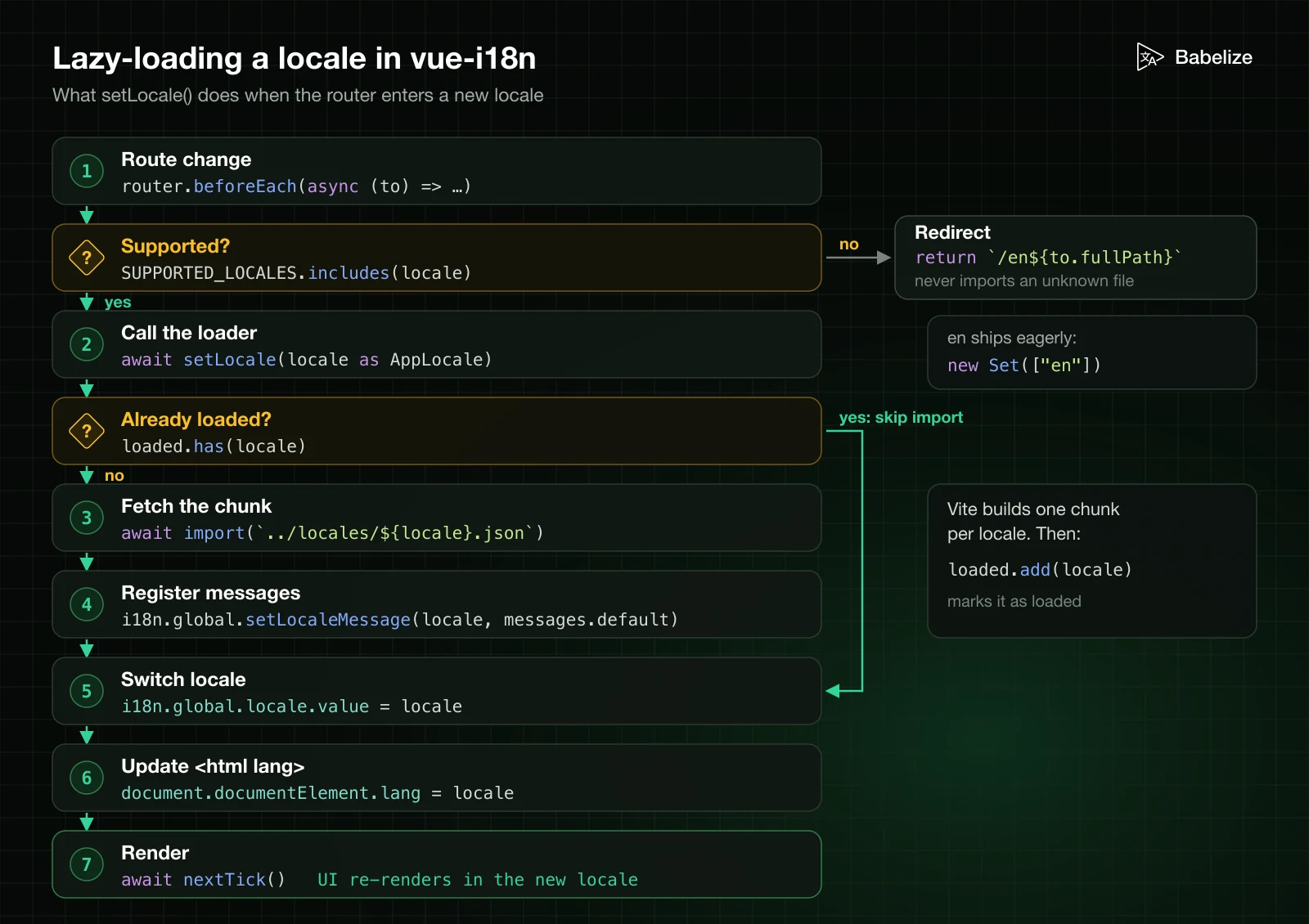
Bundling every locale into the main chunk means every visitor downloads every language. Ship the default locale eagerly and load the rest on demand with dynamic imports:
// src/i18n/load.ts
import { nextTick } from "vue";
import { i18n, type AppLocale } from "../i18n";

const loaded = new Set<AppLocale>(["en"]);

export async function setLocale(locale: AppLocale) {
    if (!loaded.has(locale)) {
        const messages = await import(`../locales/${locale}.json`);
        i18n.global.setLocaleMessage(locale, messages.default);
        loaded.add(locale);
    }
    i18n.global.locale.value = locale;
    document.documentElement.lang = locale;
    await nextTick();
}
Call it from a router guard when the locale lives in the URL:
// src/router.ts
router.beforeEach(async (to) => {
    const locale = to.params.locale as string;
    if (!SUPPORTED_LOCALES.includes(locale as AppLocale)) {
        return `/en${to.fullPath}`;
    }
    await setLocale(locale as AppLocale);
});
Vite turns the template-literal import into one chunk per locale. Keep the locale list explicit and validate the parameter before importing it, so a crafted URL cannot request arbitrary files. Also update the lang attribute (and dir for right-to-left locales); screen readers and browser translation features depend on it. Use valid BCP 47 codes for file names, URLs, and attributes; our locale codes guide covers the rules.
vue-i18n wraps Intl.NumberFormat and Intl.DateTimeFormat. Define named presets per locale once, then use them everywhere:
// src/i18n/formats.ts
import type { I18nOptions } from "vue-i18n";

export const numberFormats: I18nOptions["numberFormats"] = {
    en: {
        currency: { style: "currency", currency: "USD" },
        percent: { style: "percent", maximumFractionDigits: 1 },
    },
    de: {
        currency: { style: "currency", currency: "EUR" },
        percent: { style: "percent", maximumFractionDigits: 1 },
    },
};

export const datetimeFormats: I18nOptions["datetimeFormats"] = {
    en: {
        short: { year: "numeric", month: "short", day: "numeric" },
        long: { dateStyle: "full", timeStyle: "short" },
    },
    de: {
        short: { year: "numeric", month: "short", day: "numeric" },
        long: { dateStyle: "full", timeStyle: "short" },
    },
};
<script setup lang="ts">
import { useI18n } from "vue-i18n";
const { n, d } = useI18n();
const props = defineProps<{ total: number; currency: string; createdAt: Date }>();
</script>
<template>
<p>{{ d(props.createdAt, "short") }}</p>
<!-- the preset supplies the style; the order supplies the currency -->
<p>{{ n(props.total, { key: "currency", currency: props.currency }) }}</p>
</template>
Pass both objects to createI18n as numberFormats and datetimeFormats. One trap: a preset that hard-codes currency: "EUR" for German converts nothing; it only changes the symbol. If amounts come in different currencies, take the currency from the data, as above. The underlying Intl behavior is covered in our JavaScript Intl API guide.
With @intlify/unplugin-vue-i18n, a single-file component can carry its own messages in an <i18n> custom block:
// vite.config.ts
import { defineConfig } from "vite";
import vue from "@vitejs/plugin-vue";
import VueI18nPlugin from "@intlify/unplugin-vue-i18n/vite";
import { fileURLToPath } from "node:url";

export default defineConfig({
    plugins: [
        vue(),
        VueI18nPlugin({
            include: fileURLToPath(new URL("./src/locales/**", import.meta.url)),
        }),
    ],
});
<script setup lang="ts">
import { useI18n } from "vue-i18n";
// A component with an <i18n> block resolves to local scope implicitly
const { t } = useI18n({ useScope: "local" });
</script>
<template>
<button>{{ t("retry") }}</button>
</template>
<i18n lang="json">
{
"en": { "retry": "Try again" },
"fr": { "retry": "Réessayer" }
}
</i18n>Custom blocks are good for reusable library components that must ship their own strings. For application code they scatter translations across hundreds of files that translators and tooling cannot easily find, and the vue-i18n docs note that type-safe resources do not cover custom blocks. Prefer central JSON files per locale (see our JSON translation files guide for structure), and keep custom blocks for the exceptions.
Treat the source locale as the schema. Declaring it globally gives you autocompletion and compile errors for misspelled keys in t():
// src/i18n/vue-i18n.d.ts
import en from "../locales/en.json";

type MessageSchema = typeof en;

declare module "vue-i18n" {
    export interface DefineLocaleMessage extends MessageSchema {}
}
The same pattern works for number and date presets through DefineNumberFormat and DefineDateTimeFormat. You can also pass the schema to createI18n<[MessageSchema], "en" | "fr">(...); TypeScript then reports a missing locale in the messages object. Both approaches check keys, not translation completeness, so pair them with a CI check (below) that compares every locale file against the source.
In Nuxt 3 and Nuxt 4 projects, install the module instead of wiring vue-i18n by hand:
npx nuxi module add i18n// nuxt.config.ts
export default defineNuxtConfig({
modules: ["@nuxtjs/i18n"],
i18n: {
baseUrl: "https://example.com",
defaultLocale: "en",
strategy: "prefix_except_default",
locales: [
{ code: "en", language: "en-US", name: "English", file: "en.json" },
{ code: "fr", language: "fr-FR", name: "Français", file: "fr.json" },
{ code: "de", language: "de-DE", name: "Deutsch", file: "de.json" },
],
detectBrowserLanguage: {
useCookie: true,
cookieKey: "i18n_redirected",
redirectOn: "root",
},
},
});
In v10, locale files live in i18n/locales/ at the project root, and every file is loaded lazily, so the old lazy option is gone. Runtime-only vue-i18n options (custom plural rules, formatters, number and date presets) go in i18n/i18n.config.ts:
// i18n/i18n.config.ts
// formats.ts is the same file as in section 5, moved into i18n/
import { numberFormats, datetimeFormats } from "./formats";

export default defineI18nConfig(() => ({
    fallbackLocale: "en",
    numberFormats,
    datetimeFormats,
}));| Strategy | URLs | Use when |
|---|---|---|
prefix_except_default (default) |
/about, /fr/about |
Adding locales to an existing site without changing current URLs |
prefix |
/en/about, /fr/about |
New multilingual sites that want symmetric, explicit URLs |
prefix_and_default |
Both /about and /en/about |
Rarely; it creates duplicates that need canonical tags |
no_prefix |
/about for every locale |
Logged-in apps where SEO per locale does not matter |
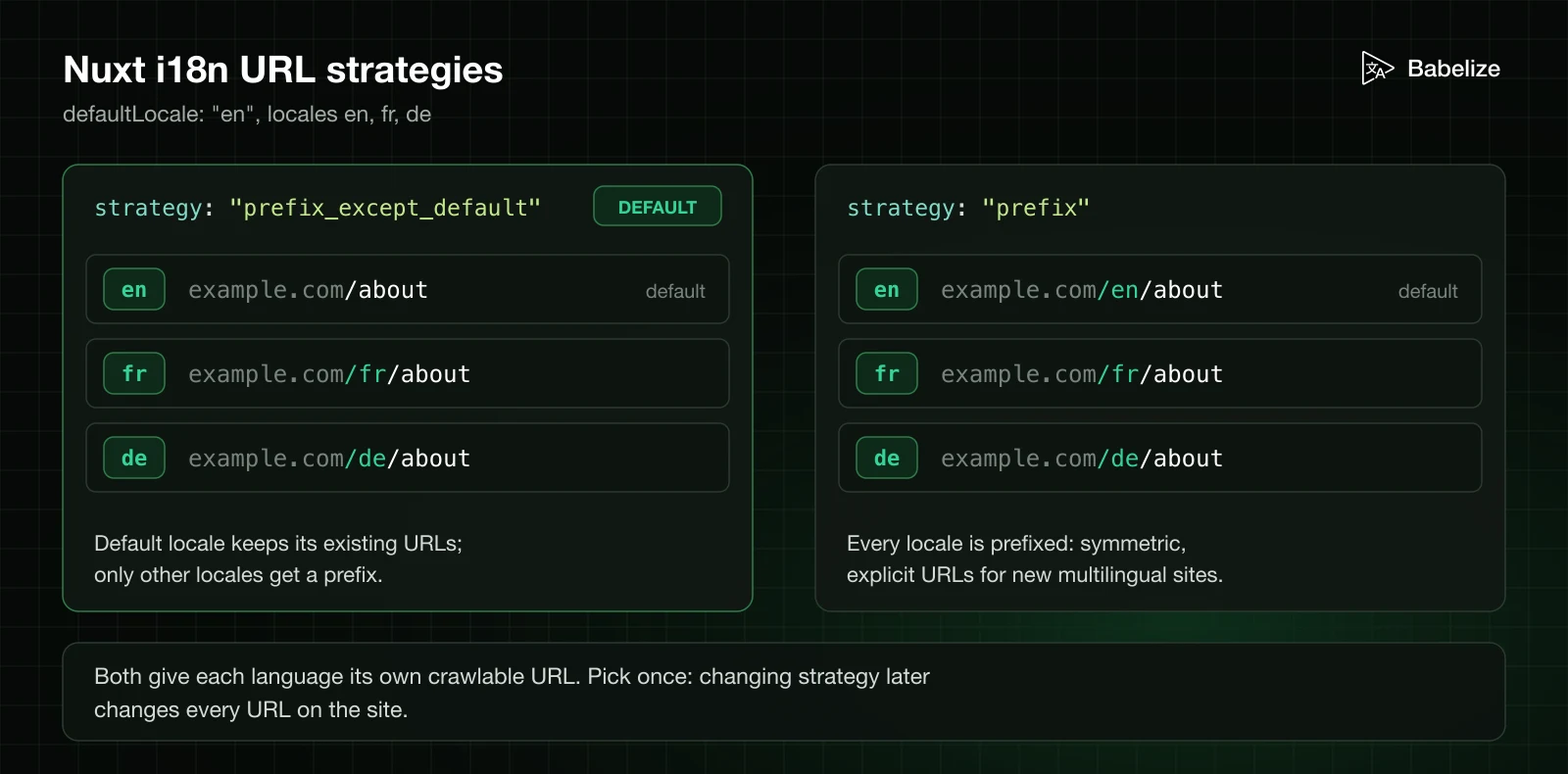
Pick once. Changing strategy later changes every URL on the site. Navigation should go through the module's helpers so links keep the current locale:
<script setup lang="ts">
const { locale, locales } = useI18n();
const switchLocalePath = useSwitchLocalePath();
</script>

<template>
    <NuxtLinkLocale to="/pricing">{{ $t("nav.pricing") }}</NuxtLinkLocale>

    <NuxtLink
        v-for="l in locales"
        :key="l.code"
        :to="switchLocalePath(l.code)"
        :aria-current="l.code === locale ? 'true' : undefined"
    >
        {{ l.name }}
    </NuxtLink>
</template>
useLocaleHead() returns the lang and dir attributes, hreflang alternate links including x-default, a canonical link, and og:locale tags. It needs baseUrl and a language tag on each locale to produce absolute, valid URLs. Add it once in your root layout:
<script setup lang="ts">
const head = useLocaleHead();

useHead(() => ({
    htmlAttrs: { lang: head.value.htmlAttrs?.lang, dir: head.value.htmlAttrs?.dir },
    link: [...(head.value.link ?? [])],
    meta: [...(head.value.meta ?? [])],
}));
</script>

<template>
    <NuxtPage />
</template>
Then confirm the rendered HTML: every locale version should list every other version, and each page's canonical should point at itself, not at the default language. Our hreflang and multilingual SEO guide explains what search engines expect.
Mount components with a real i18n instance instead of mocking t, so tests catch broken keys and interpolation:
// tests/CartSummary.spec.ts
import { mount } from "@vue/test-utils";
import { createI18n } from "vue-i18n";
import { expect, test } from "vitest";
import CartSummary from "../src/components/CartSummary.vue";
import en from "../src/locales/en.json";

function makeI18n() {
    return createI18n({
        legacy: false,
        locale: "en",
        messages: { en },
        missing: (locale, key) => {
            throw new Error(`Missing translation: ${locale}.${key}`);
        },
    });
}

test("renders the plural form", () => {
    const wrapper = mount(CartSummary, {
        props: { count: 3 },
        global: { plugins: [makeI18n()] },
    });
    expect(wrapper.text()).toContain("3 items");
});
Add a key-parity check to CI so a locale cannot silently fall behind the source file:
// scripts/check-locales.ts
import { readFileSync, readdirSync } from "node:fs";

const flatten = (obj: Record<string, unknown>, prefix = ""): string[] =>
    Object.entries(obj).flatMap(([k, v]) =>
        v && typeof v === "object"
            ? flatten(v as Record<string, unknown>, `${prefix}${k}.`)
            : [`${prefix}${k}`],
    );

const dir = "src/locales";
const source = new Set(flatten(JSON.parse(readFileSync(`${dir}/en.json`, "utf8"))));
let failed = false;

for (const file of readdirSync(dir).filter((f) => f !== "en.json")) {
    const keys = new Set(flatten(JSON.parse(readFileSync(`${dir}/${file}`, "utf8"))));
    const missing = [...source].filter((k) => !keys.has(k));
    if (missing.length) {
        failed = true;
        console.error(`${file} is missing ${missing.length} keys:`, missing.slice(0, 10));
    }
}

process.exit(failed ? 1 : 0);
Finally, run the UI in a pseudo-locale to find hard-coded strings and layouts that break with longer text. Our pseudo-localization guide shows how to generate one from your source JSON.
legacy at its default. The Legacy API is deprecated in v11 and tree-shaken by the bundler plugin. Set legacy: false explicitly.pluralRules, Polish and Russian pick the wrong form for numbers like 5 or 22.@, |, {, and } in plain text cause compile errors or silent plural splits. Use literal interpolation such as {'@'}.t("hello") + " " + name fixes word order to English. Put the variable inside the message.v-html. Use <i18n-t> slots instead.useI18n with local scope twice in one component. vue-i18n warns and the second call does not behave as expected; call it once and destructure what you need.locale and then reassigning it. locale is a ref; write to locale.value, or use setLocale in Nuxt so lazy messages load first.Use the Composition API. Create the instance with createI18n({ legacy: false }) and call useI18n() in components. The Legacy API is deprecated in vue-i18n v11 and is scheduled for removal in v12, and the tc() and $tc() functions have already been removed.
No. vue-i18n has its own syntax: {name} for named values, {0} for list values, @:key for linked messages, and pipe-separated plural forms such as "one item | {count} items". ICU plural blocks from other libraries will not work without a custom message compiler.
In vue-i18n v11, register a function for each locale with the pluralRules option of createI18n. Building the function on Intl.PluralRules lets you list forms in CLDR order (one, few, many, other) instead of writing modulo arithmetic by hand.
In Vue, load the JSON with a dynamic import, register it with i18n.global.setLocaleMessage(), then set i18n.global.locale.value. In Nuxt, @nuxtjs/i18n v10 lazy-loads every locale file listed in the locales option automatically.
Both prefix and prefix_except_default give each language its own crawlable URL. Use prefix_except_default to keep existing URLs for the default language, or prefix for symmetric URLs on a new site. Combine either with useLocaleHead(), baseUrl, and a language tag on each locale to output hreflang and canonical links.
Good Vue localization is mostly a set of early decisions: Composition API from day one, one JSON file per locale with typed keys, explicit plural rules for every language you ship, lazy loading, and n() and d() for anything numeric. In Nuxt, the module covers routing, lazy loading, and SEO tags, so your job is choosing a URL strategy and keeping the locale files complete. If you want help keeping those files in sync, Babelize generates per-locale JSON files that vue-i18n can load directly.